Website Is Live But Not Showing on Google? Here's Exactly Why
July 28, 2026
You paid someone to build your website. It looks good. It’s live. You can open it on your phone and show it to customers. But when you search for your business on Google — nothing. Your website isn’t there.
If you’re asking why is my website not showing on google, you’re dealing with one of the most common and most misunderstood problems in digital marketing. A website being “live” and a website being “visible on Google” are two completely different things. Most businesses in Kerala find this out only after the website has been sitting unvisited for months.
This post explains exactly what that difference is — and what actually works.
How Google Actually Finds a Website (Most People Don't Know This)
Before getting to the reasons, it helps to understand the process Google follows. There are three stages — and your website might be stuck at stage one or two without you knowing it.
|
Stage
|
What It Means
|
What Google Does
|
|---|---|---|
|
Crawling
|
Google "reads" your website
|
Google's bots visit your website and scan its pages
|
|
Indexing
|
Google stores your website in its database
|
If Google understands your website, it adds it to its index — the list of all searchable websites
|
|
Ranking
|
Google decides where to show you
|
When someone searches a relevant term, Google decides which position your page deserves
|
Your website can fail at any of these stages.
Most business owners assume that going “live” automatically completes all three. It doesn’t. Google has to find your website, understand it, and decide it’s worth showing. Each of those steps requires specific actions — and most websites built by non-SEO focused developers skip all of them.
- Key Insight
“Indexed” means Google has added your website to its database and can show it in search results. “Not indexed” means Google hasn’t stored your website at all — it’s as if your website doesn’t exist from Google’s perspective. This is the most common cause of a website not showing on Google.
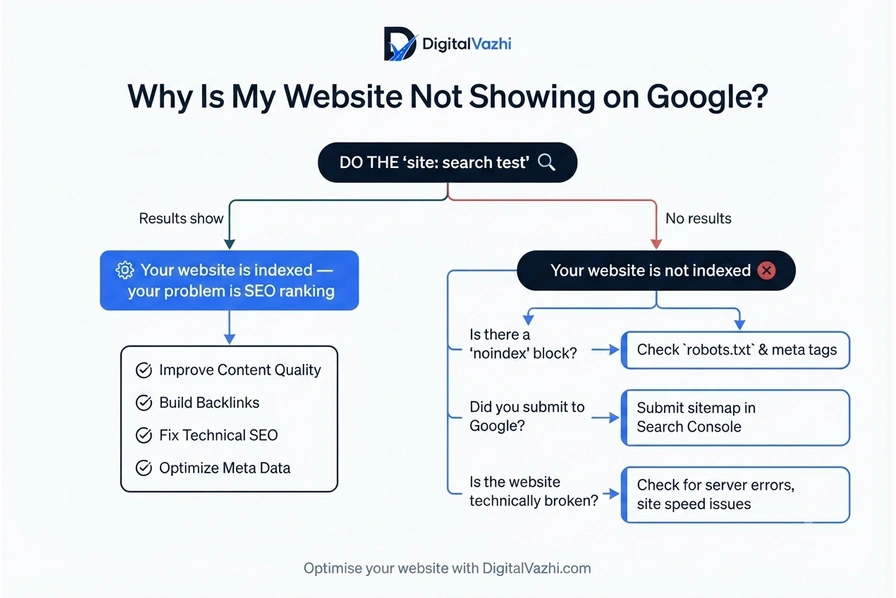
Do This Right Now — Check If Google Has Even Found Your Website
Before diagnosing the cause, you need to know which stage your website is stuck at. This takes 30 seconds.
- The site: search test
Open Google
In the search bar, type: site:yourwebsite.com (replace with your actual domain)
Press enter
If you see results: Google has indexed your website. Your problem is in Stage 3 — ranking. Move to the ranking reasons below.
If you see results: Google has indexed your website. Your problem is in Stage 3 — ranking. Move to the ranking reasons below.
This one check tells you everything. Most people skip it and try to fix the wrong problem.
The 5 Reasons Your Website Isn't Showing on Google
Here are the specific causes — ordered from most to least common for local businesses in Kerala.
Reason 1 — Google Hasn't Found Your Website Yet
The most common reason: nobody told Google your website exists.
Google discovers websites through a process called crawling — its bots travel the web following links. If no other website links to yours, Google may never stumble upon it. A brand-new website with no incoming links can sit invisible for months.
The fix is to actively submit your website to Google using Google Search Console — Google’s free tool for website owners. Submitting a sitemap (a file that lists all your website’s pages) tells Google exactly where to find you and what pages to crawl.
According to Google Search Central’s indexing documentation, submitting a sitemap is one of the most effective ways to ensure Google discovers and indexes all pages of a new website.
How to submit to Google:
Go to Google Search Console and add your website
Verify ownership (Google will guide you through this)
Submit your XML sitemap (your website developer or WordPress plugin can generate this)
Request indexing for your main pages individually using the “URL Inspection” tool
Reason 2 — Your Website Is Accidentally Telling Google to Stay Out
This is more common than you’d think — especially on websites built with WordPress.
When developers build a website, they often tick a box during development that says “Discourage search engines from indexing this site.” It’s meant to be temporary, while the site is being built. Many developers forget to untick it when the site goes live. Your website is then actively blocking Google from indexing it.
- Warning
Check this immediately. In WordPress: go to Settings → Reading. Look for the checkbox that says “Discourage search engines from indexing this site.” If it’s ticked — your website is invisible to Google by your own instruction. Untick it and save.
Even if you’re not on WordPress, your website may have a “noindex” tag in its code. This is a line that tells Google: “Don’t show this page in search results.” Ask your developer to check for it, or use Google Search Console’s URL Inspection tool to see if your pages are marked as noindex.
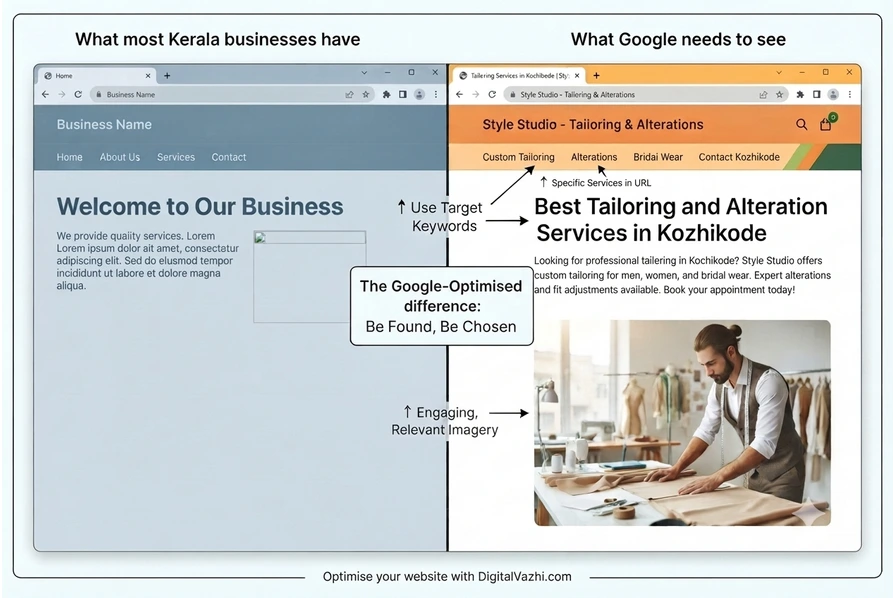
Reason 3 — Your Website Doesn't Tell Google What It's About
Google’s job is to match searchers with relevant results. If your website doesn’t clearly communicate what you do and where you do it, Google has nothing to match your website against.
This is extremely common in Kerala, where many websites are built with a focus on visual design — and almost no attention to the text content, page titles, or structure that Google actually reads.
- Signs your website isn't telling Google what it does:
- Your homepage title (the text that appears on the browser tab) says "Home" or "Welcome" instead of your business name and service
- Your homepage heading says "We provide the best services" instead of, for example, "Boxing Academy in Malappuram — Impact Boxing"
- Your website has very little text content — mostly images and design
- Your website has no page dedicated to each specific service you offer
- The words on your website don't match what customers type into Google when looking for your service
Google reads your page titles, headings, and content to understand what you are. If those elements don’t describe your service and location clearly, your website isn’t my website is not ranking on google for any relevant search — because Google doesn’t know what to rank it for.
Reason 4 — Your Website Is Brand New and Google Needs Time
For new websites with no incoming links and no history, Google can take between 4 days and several weeks to crawl and index the site after it’s submitted.
This is normal. But there are specific actions that speed it up.
How to speed up Google indexing for a new website:
Submit to Google Search Console and request indexing manually for each important page
Add your website to your Google Business Profile — Google trusts its own ecosystem and follows those links quickly
Share your website on your social media profiles — Instagram, Facebook, WhatsApp Business. These create signals that your site exists
List your business on Google-trusted directories like Justdial, Sulekha, or IndiaMART with a link to your website
The fastest way is always Search Console direct submission — Google typically crawls submitted URLs within a few days.
Reason 5 — Your Website Has Technical Problems Google Can't Ignore
Even if Google finds your website and understands what it does, it may still not rank it if the website has significant technical problems. According to Google’s Core Web Vitals research, page loading speed and mobile usability are direct ranking factors — Google will rank a fast, mobile-friendly website above a slow, desktop-only one even if the content is similar.
|
Technical Issue
|
What It Means
|
How to Check
|
|---|---|---|
|
Slow loading
|
Pages take more than 3 seconds to open
|
Test at pagespeed.web.dev
|
|
Not mobile-friendly
|
Website doesn't work correctly on phones
|
Test at search.google.com/test/mobile-friendly
|
|
No HTTPS / SSL
|
Website URL starts with "http" not "https"
|
Look at the address bar — no padlock = no SSL
|
|
Broken links
|
Pages on your website lead to error pages
|
Google Search Console → Coverage report
|
|
Duplicate content
|
Same content appearing on multiple URLs
|
Google Search Console → Indexing issues
|
How to Make Your Website Appear on Google — The Complete Action Plan
If you’ve identified the cause from above, here’s the full sequence to follow.
Remove any Google blocks
Check for the WordPress “discourage search engines” setting. Check your pages for noindex tags. Remove both.
Set up Google Search Console
Free tool, takes 15 minutes. Submit your sitemap. Request indexing for your homepage and main service pages.
Fix your page titles and headings
Every page on your website should have a title that includes your service and your location. Your homepage heading should clearly state what you do and where.
Add your website to your Google Business Profile
Go to your GBP listing and make sure your website URL is linked correctly. This creates a high-trust signal that speeds up Google’s indexing.
Fix technical issues
Check your website speed, mobile friendliness, and SSL certificate. These are not optional for Google ranking in 2025.
Wait — but monitor
After submitting to Search Console, check the Coverage and Indexing reports weekly. If pages are being rejected, it will show you exactly why.
- Key Insight
Many Kerala business websites are built by developers who hand over a live website and consider the job done. But a live website with no SEO foundation is like a shop with no signboard — it exists, but nobody walking past can tell what it is.
How Long Will It Take for Your Website to Show on Google?
|
Situation
|
Expected Timeline
|
|---|---|
|
Website submitted to Search Console
|
4 days to 2 weeks for indexing
|
|
Website linked from Google Business Profile
|
Often within 1 week
|
|
New website with basic SEO (titles, content)
|
2–8 weeks to begin appearing for branded searches
|
|
New website with full local SEO strategy
|
1–4 months to rank for competitive local terms
|
|
Established website with technical fixes applied
|
2–6 weeks for improvements to take effect
|
Indexing (appearing at all on Google) happens faster than ranking (appearing on page one). Focus on indexing first, then ranking.
Key Takeaways
Why Is My Website Not Showing on Google — Answered:
- A live website and an indexed website are different things. Google has to find, read, and store your website before it can show it to anyone.
- Do the site:yourwebsite.com test in Google right now to confirm whether your website is indexed or not.
- The 5 most common reasons are: not submitted to Google, accidental noindex block, no keyword-relevant content, website is too new, or technical problems like slow loading.
- The fastest fixes: remove any noindex blocks, submit to Google Search Console, and link your website to your Google Business Profile.
- If google not indexing my website after you've taken these steps, the problem is almost always technical — requiring an SEO audit to identify the root cause.
- How to make website appear on google: Submit to Search Console, fix your page titles and headings, resolve technical issues, and build your website's relevance signals over time.
Is your website practically invisible?
Most websites in Kerala are built without any of the SEO foundation that Google requires. If your website has been live for months and still isn’t showing on Google, the problem is almost certainly in the build — not in the time it’s been running.
We build websites specifically to rank on Google — every title, heading, and page structure is built around what Google needs to see. And if you already have a website that needs fixing, we audit and resolve the issues that are keeping you invisible.
DigitalVazhi
DIDITAL WAY
DigitalVazhi is a digital marketing agency in Malappuram, Kerala, helping businesses across Kerala grow through SEO, Google Ads, Meta Ads, web development, and more.
Our Services
Locations
- Malappuram
- Kozhikode (Calicut)
- Thrissur
- Kochi (Ernakulam)
- Across Kerala
Contact Us
- Koottilangadi, Malappuram, Kerala 676506
- +91 9778753498
- digitalvazhi@gmail.com
© 2026 DigitalVazhi. All rights reserved.